Home

One suite for every stage of your data's life.

DBMojo Core is the platform underneath five independently-installable tools — Detanami, DataMosaic, Flow, Smith, and Blueprint — providing single sign-on, shared data connections, approval-gated deployments, version control, and tamper-evident auditing across all of them.

My Suite
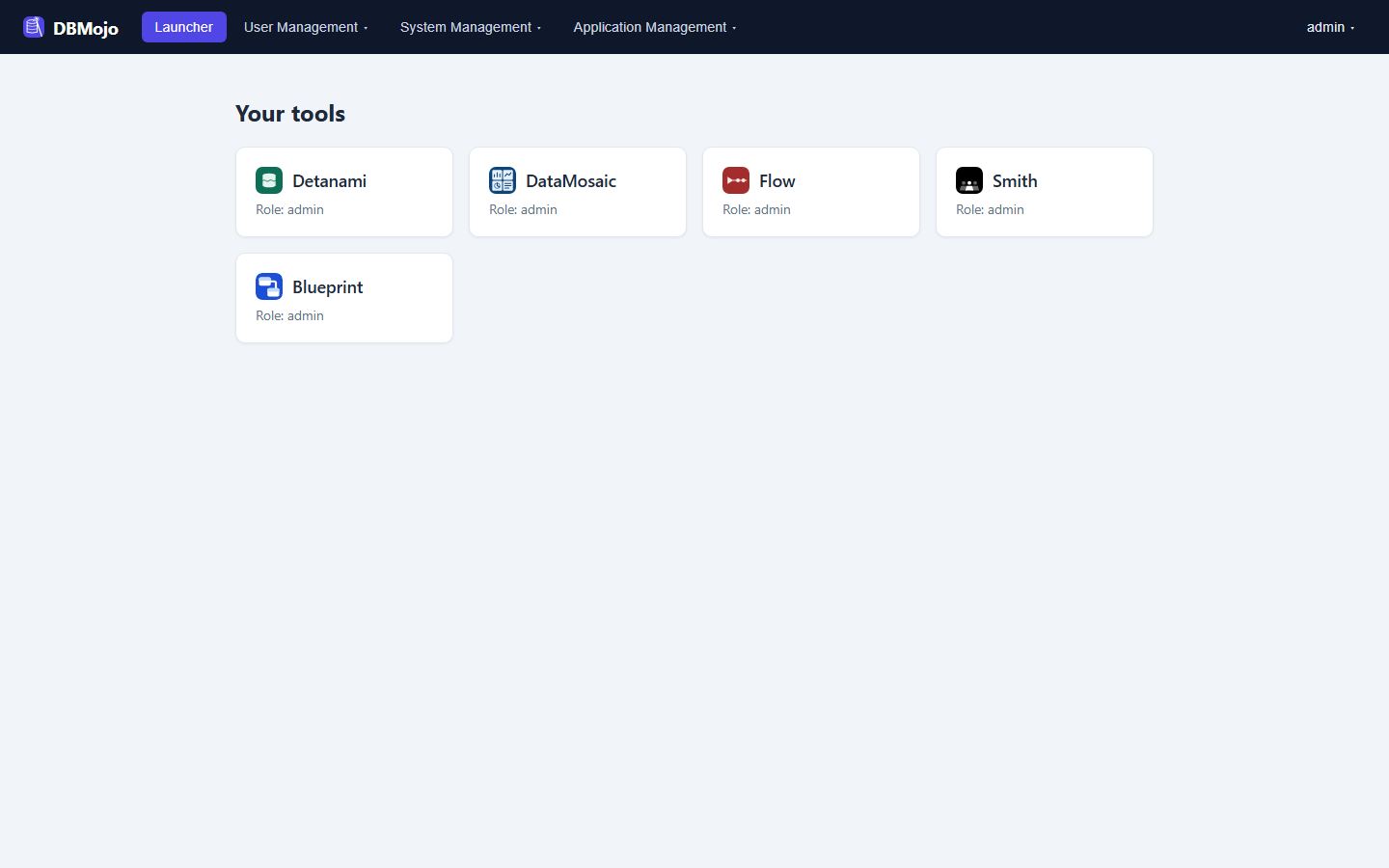
One login, five tools

DBMojo Core launcher showing Detanami, DataMosaic, Flow, Smith, and Blueprint tiles under one signed-in account, with User Management, System Management, and Application Management menus in the top nav
Beta

Detanami

32 databases · AI tuning

Connect, browse, and tune SQL and NoSQL databases from one console.

In development

DataMosaic

query graph · dashboards

Build dashboards from a visual query graph and share them live with your team.

In development

Flow

nodes · pipelines

Drag-and-drop orchestration across databases, APIs, and message queues.

In development

Smith

agent · notebook

An AI co-pilot that writes queries and generates deployable data APIs.

In development

Blueprint

ER canvas · DDL · diff

A web-based data modeler that reverse-engineers a schema and files changes as approved deployments.

Platform

DBMojo Core

The platform every tool runs on — one identity, one credential vault, one approval ledger, one audit trail, shared across Detanami, DataMosaic, Flow, Smith, and Blueprint. None of the five tools run without it.

Core isn't a proxy in front of the tools — it's the identity, credential, approval, and audit layer they all read from. It never connects to your databases itself; the tool that owns a connection does the work.
  • Single sign-on across every tool with per-app, per-role access — plus OpenID Connect (with an EntraID preset) and SAML 2.0 identity providers and just-in-time user provisioning
  • Shared Data Connections — save a connection once, share it with groups, and every tool uses it without anyone re-entering credentials; Core can test it for you
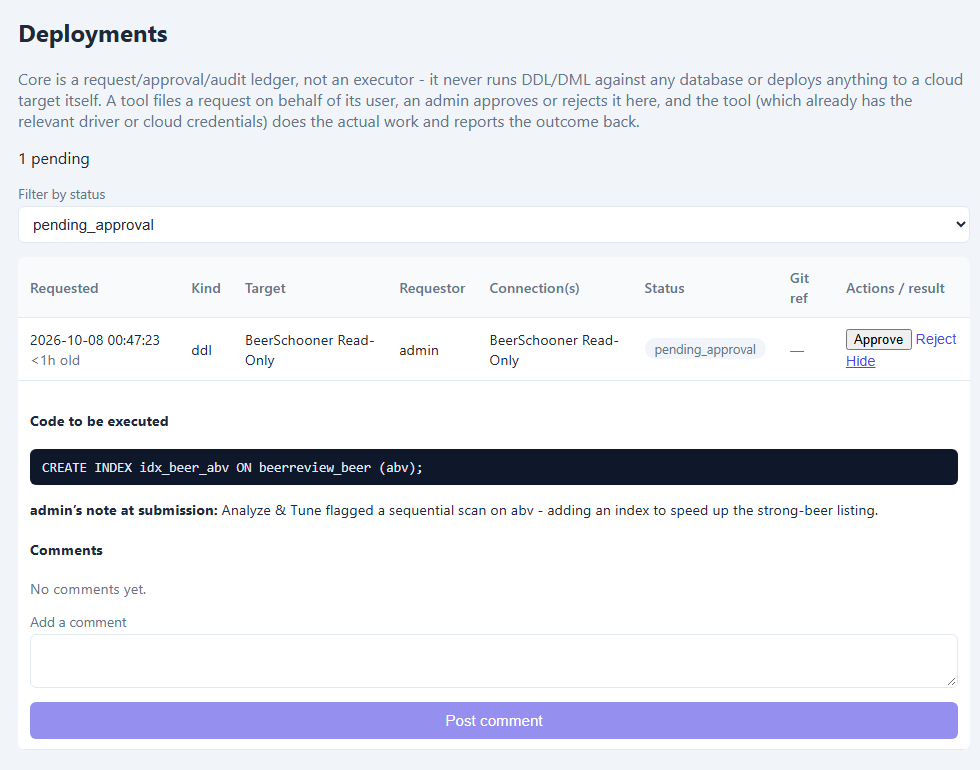
  • Approval-gated deployments — a DDL change, a generated API, or a flow is filed as a request, an approver reads the exact code before deciding, and the owning tool runs it. Core only records the decision.
  • CI/CD tokens let an external pipeline file requests but never approve one
  • Version control for flows, notebooks, and dashboards via GitHub, GitLab, Bitbucket, or Bitbucket Server
  • Tamper-evident, hash-chained audit logging across the whole suite, with an auditor role for separation of duties
Core's Deployments page showing a pending DDL request with the exact CREATE INDEX statement to be executed, the requester's note, and a comment thread, with Approve and Reject actions

Review before approving: the approver sees the exact SQL, the requester's note, and a comment thread — here, an index suggested by Detanami's Analyze & Tune.
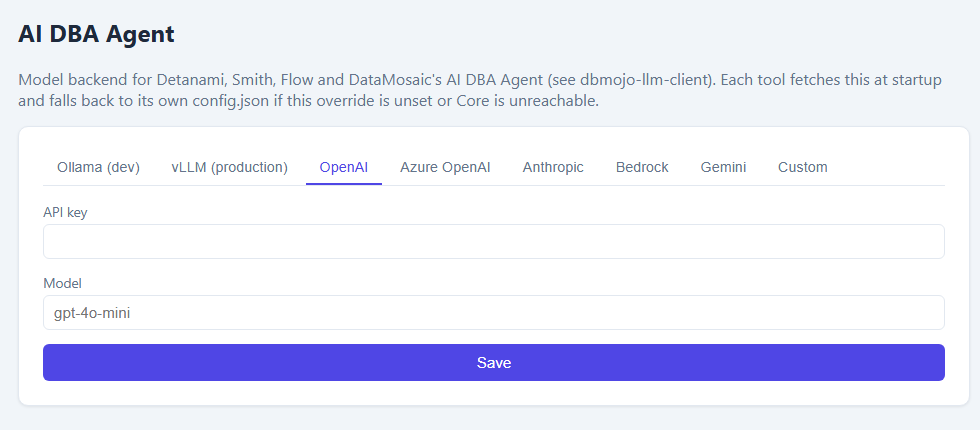
Core's AI DBA Agent page with tabs for Ollama, vLLM, OpenAI, Azure OpenAI, Anthropic, Bedrock, Gemini, and Custom

Bring your own model. One page sets the AI backend for every tool — self-hosted Ollama or vLLM for air-gapped installs, or OpenAI, Azure OpenAI, Anthropic, Bedrock, or Gemini.
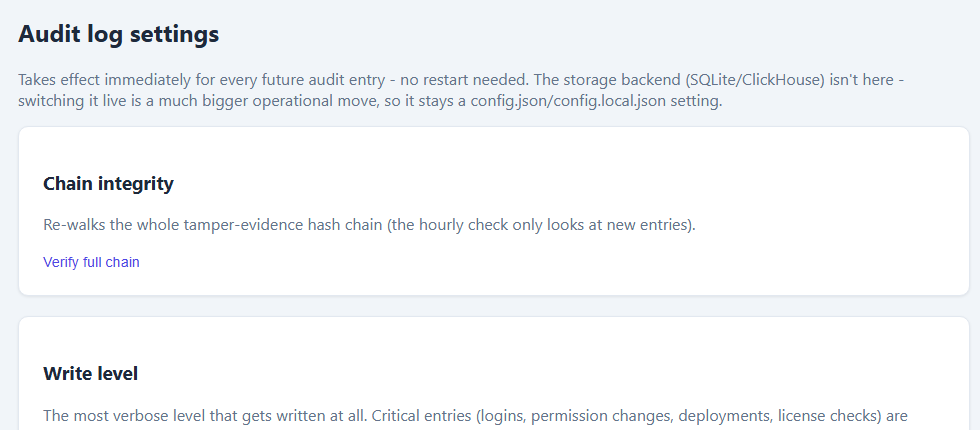
Core's audit log settings page with a Chain integrity panel, write level, and retention presets

Audit you can verify. A hash-chained log you can re-check on demand, with compliance-named retention presets and PHI/PII scrubbing.

Database management

Detanami

A web-based client for connecting to, exploring, and managing your databases — SQL and NoSQL alike — without switching tools per engine.

Beta

Detanami is designed as an intuitive NoSQL client at heart, extended to cover the SQL engines teams already run in production. Redis and MongoDB get their own dedicated consoles instead of being forced through a SQL workbench that doesn't fit them.
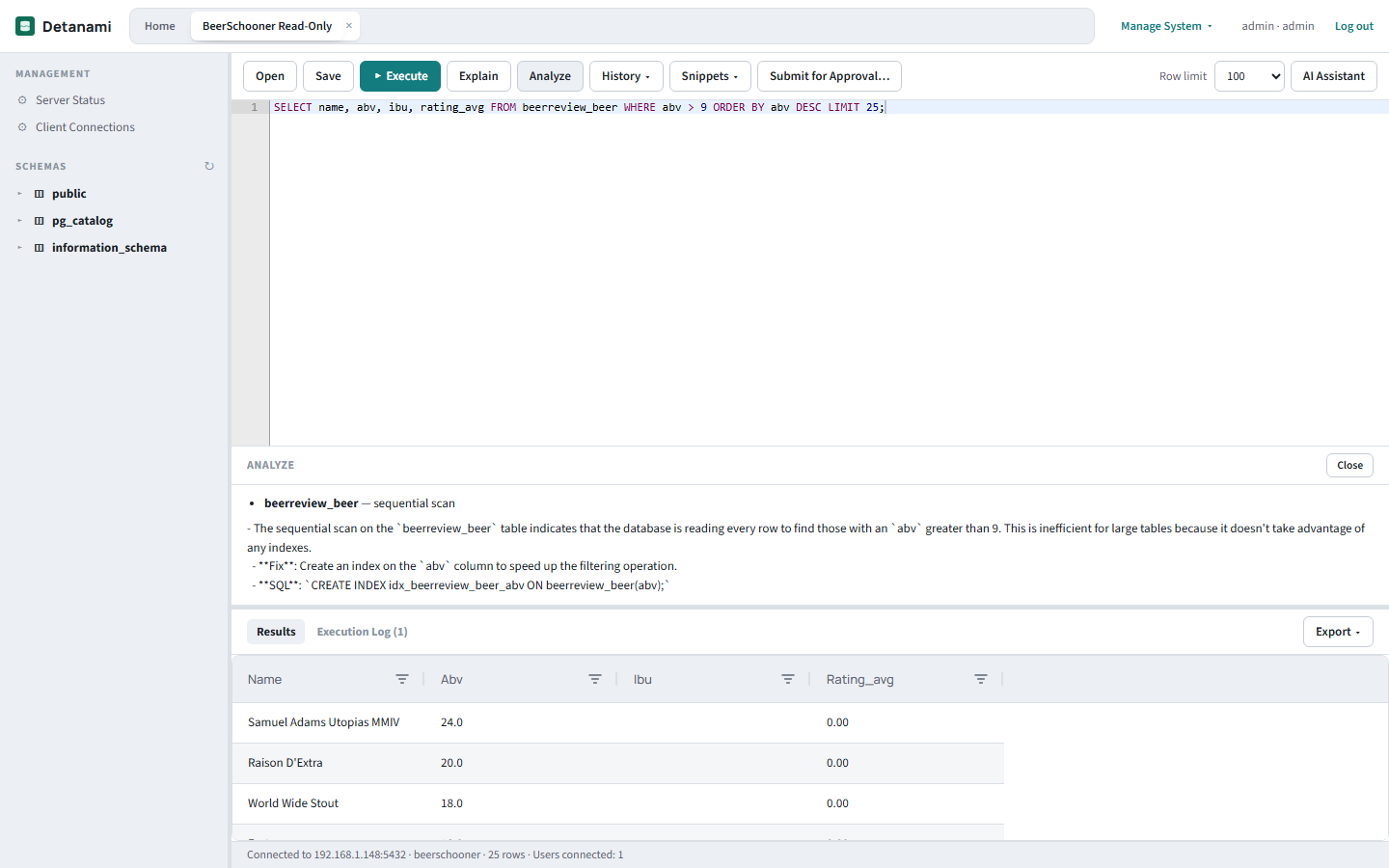
  • SQL workbench for MySQL, MariaDB, Apache Doris, PostgreSQL, TimescaleDB, Amazon Redshift, MSSQL, Azure SQL, Oracle, SQLite, DuckDB, ClickHouse, IBM DB2, Firebird, the cloud warehouses Snowflake, BigQuery, Athena and Spanner, the Trino-protocol engines Trino, Presto and Apache Iceberg, Cassandra, Neo4j and InfluxDB, plus Couchbase (N1QL) and Elasticsearch (SQL), with an inline-editable results grid, saved query snippets, and a per-statement Execution Log
  • Dedicated consoles for Redis, MongoDB, and CouchDB
  • An Explorer that goes beyond tables — indexes, procedures, functions, triggers, and events, with their definitions one double-click away
  • Analyze & Tune — EXPLAIN-plan findings paired with an AI-written narrative explaining what's actually slow and why, including unused primary keys and missing partition filters on ClickHouse MergeTree tables
  • Import CSV, TSV, and spreadsheet files as new tables or append to existing ones, and save or load SQL scripts to your Git repo straight from the editor
  • An AI Assistant chat docked beside the editor — schema-aware, and it drafts SQL you review before anything runs
  • Submit for Approval — file a change against any connection, even one you can't query directly, with a note for the approver; run it from Core's queue once approved
  • Shared Connections from Core open in one click with no password prompt, and TLS/SSL is configurable on every networked connection
Detanami's SQL workbench after running Analyze: a sequential-scan finding on beerreview_beer, an AI explanation with a suggested CREATE INDEX, and the results grid below

Analyze & Tune on a live PostgreSQL table: the plan finding (a sequential scan on beerreview_beer), a plain-language explanation, and the suggested CREATE INDEX — ready to file for approval.

Visualization

DataMosaic

Connect a data source, drag out a dashboard, and share it — built for the back-and-forth between analysts and the people asking them questions.
In development
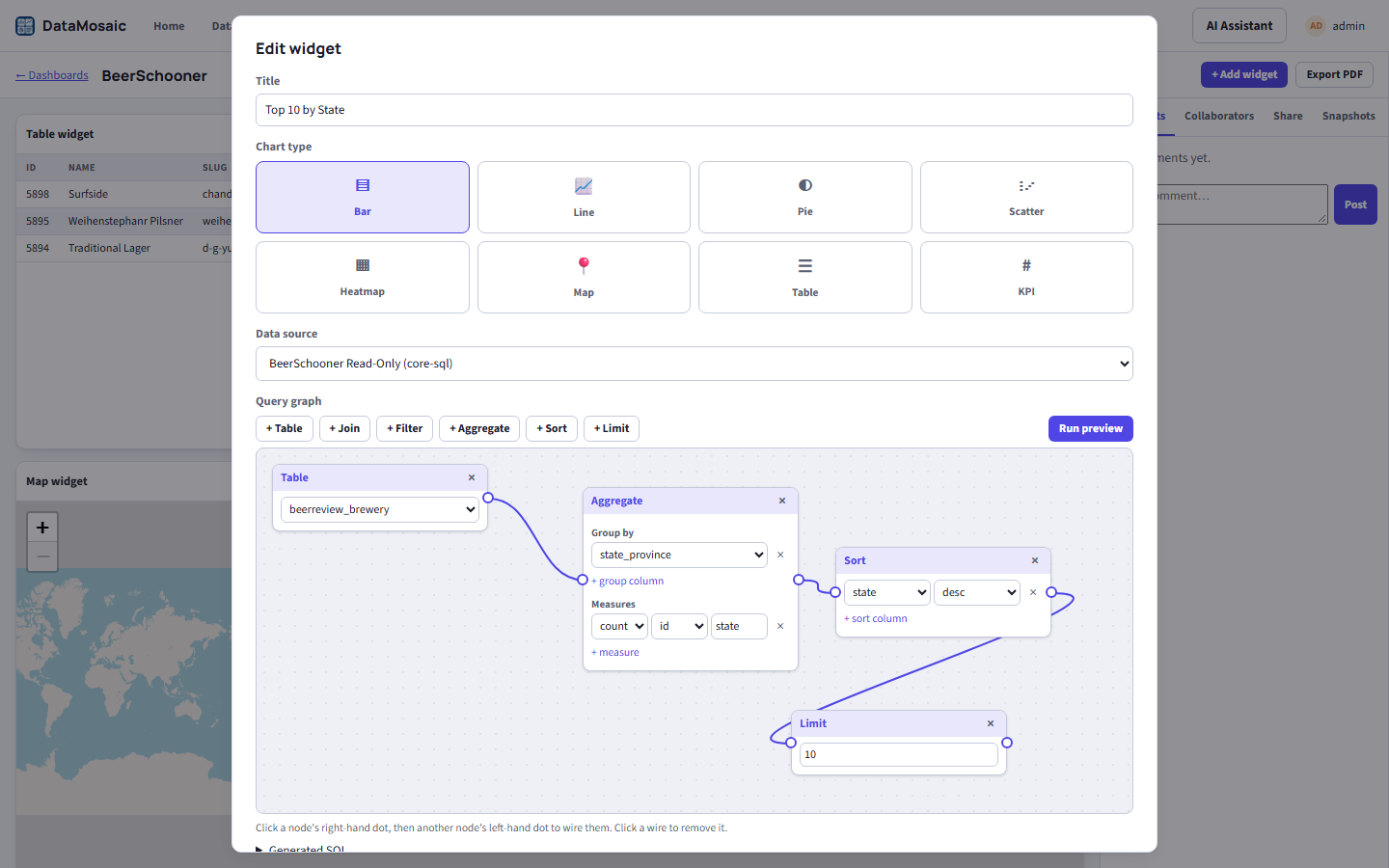
  • Visual query graph — wire Table, Join, Filter, Aggregate, Sort, and Limit nodes together; the graph compiles to one read-only, parameterised SQL statement that runs in your database (MySQL/MariaDB/Doris, PostgreSQL/TimescaleDB, SQL Server/Azure SQL, DB2, Firebird, Snowflake, BigQuery, Spanner, Athena, Trino/Presto/Iceberg, Couchbase, and Elasticsearch, via Shared Connections)
  • Also connect sample datasets, uploaded spreadsheets (.csv, .xlsx, .xls, .ods), and live REST APIs
  • 42 chart variants across Bar, Line, Area, Scale, and Other tabs — plus map, table, and KPI widgets — with cross-filters pushed down into the SQL and color themes for a whole dashboard or a single widget
  • Live collaboration — presence, comments, and instant sync over Socket.IO for everyone viewing the same dashboard
  • One-click DBOps dashboards chart the telemetry Flow's AI DBA nodes push to Core; trend lines and anomaly flagging on bar and line charts
  • Share with named people as viewers or editors, or publish a public link with an expiry, an embeddable <iframe> of a whole dashboard or one live widget, or an edit link for guests
  • Export a dashboard as PNG, PDF, an Excel data workbook, or a portable JSON definition — and import one to recreate it
DataMosaic's widget editor showing a visual query graph: a Table node feeding Aggregate, Sort, and Limit nodes for a Top 10 by State bar chart

The visual query graph behind a Top 10 by State widget: Table → Aggregate → Sort → Limit, compiled to SQL and previewed live.
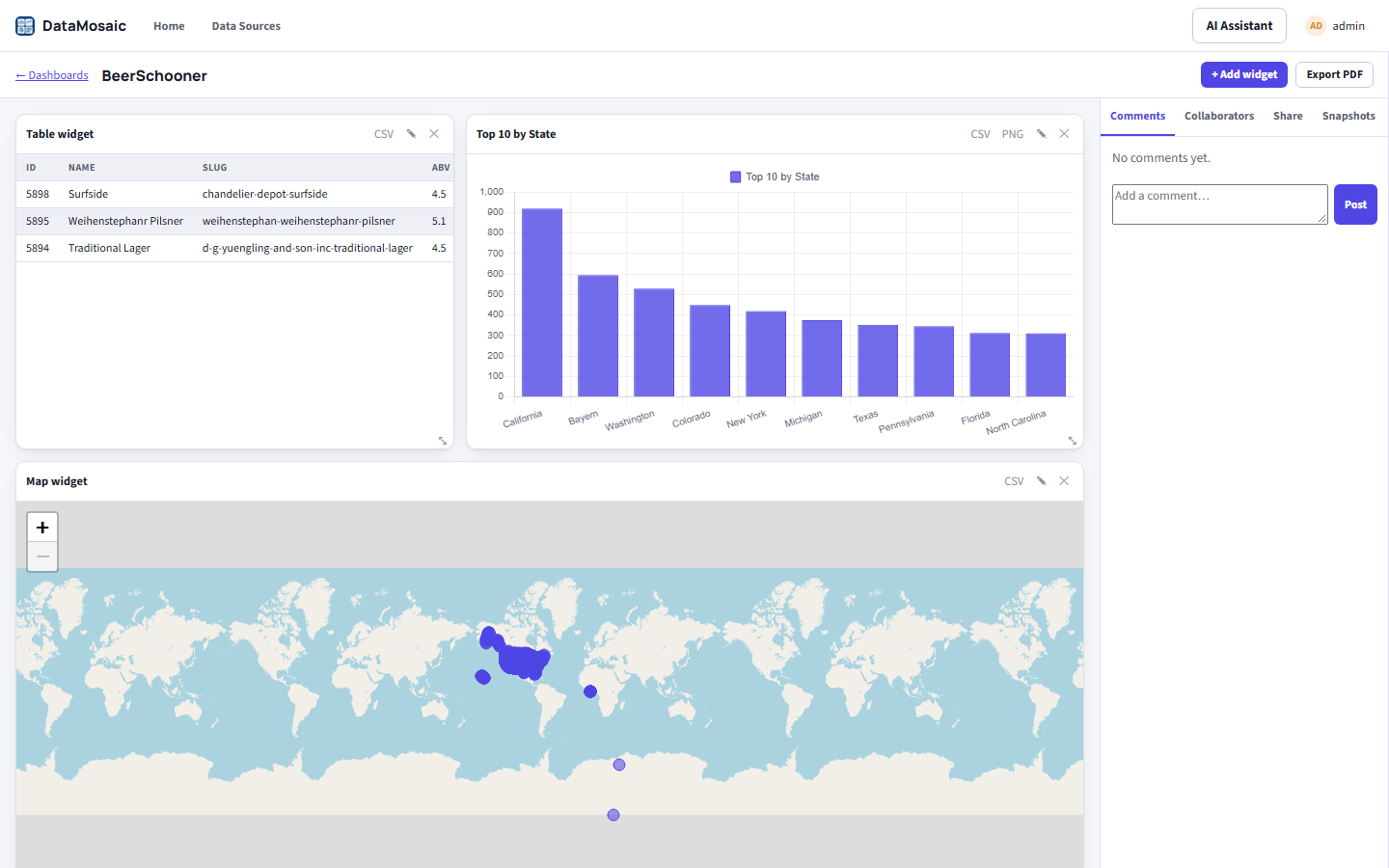
DataMosaic's BeerSchooner dashboard with a SQL-backed table, a Top 10 by State bar chart, and a map widget

The finished BeerSchooner dashboard — a table, a bar chart, and a map, all backed by queries against the same shared connection.

Orchestration

Flow

Inspired by Node-RED — wire up sources, transforms, and destinations visually, and let Flow run the pipeline on schedule or in response to events.
In development
  • Drag-and-drop workflow builder, no code required to get started
  • A deep node library — databases, HTTP, MQTT, WebSocket, TCP, Kafka (with a shared broker config node), email, file I/O — plus subflows, groups, and custom nodes
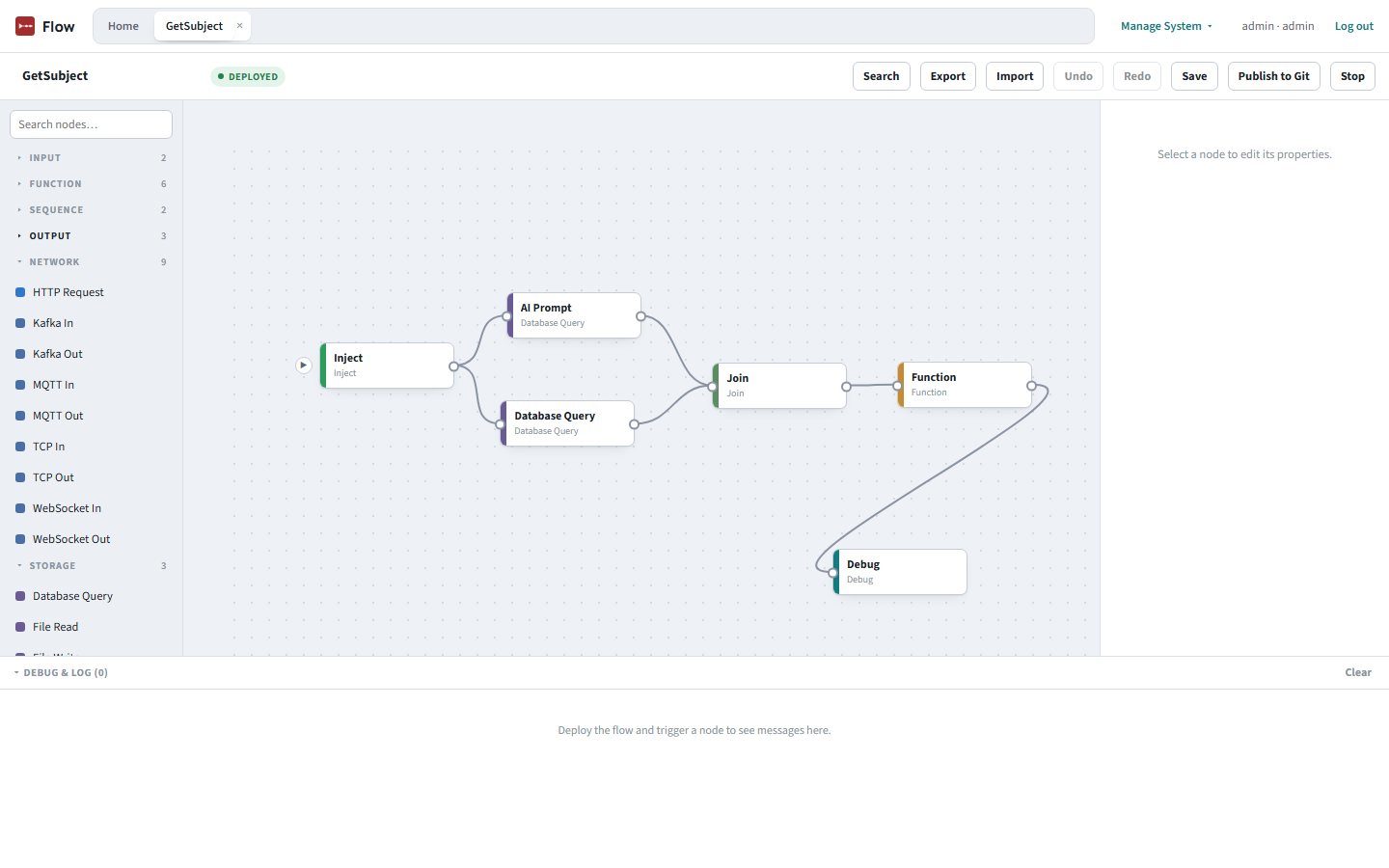
  • Parallel branches that rejoin — Join's count mode merges fan-out queries into one message (an array, or an object keyed by topic), with an optional timeout
  • Database Query nodes use Shared Connections from Core, and flag a deleted or unshared one before you deploy
  • Database Query reaches MySQL/MariaDB/Doris, PostgreSQL/TimescaleDB, DuckDB, DB2, Firebird, Snowflake, BigQuery, Athena, Spanner, Trino/Presto/Iceberg, Cassandra, Neo4j, InfluxDB, Solr, OpenSearch, Couchbase, and Elasticsearch, as well as SQLite
  • AI DBA nodes — Telemetry Poller and Index Evaluator push live performance data back to the suite
  • Real-time triggers with a live debug feed, a node-scoped AI Assistant, and per-node error routing
  • Presence-aware collaboration — see who else has a flow open, with a stale-save warning if you collide
Flow's editor showing a deployed fan-out and fan-in flow: Inject feeds two database queries that rejoin in a Join node, then a Function and Debug node, with the Toolbox showing Network nodes including Kafka In and Kafka Out

A deployed fan-out/fan-in flow — two database branches rejoin in a Join node — with the Toolbox collapsed to show the Network nodes, including Kafka In and Kafka Out.

AI-assisted development

Smith

A notebook where an AI agent reasons about your schema, not just your prompt — then generates a real, callable data API you can preview on the spot and deploy once it's approved.

In development

Smith bridges AI reasoning and database physics: it writes SQL and Node.js against your actual schema, generates a deterministic Data API from any table, previews it locally against the real database, and can serve it from API workers in your own Docker deployment, ship it to AWS Lambda, or save it to your Git repo — with Lambda and API-worker deploys of Core connections going through Core's approval ledger and the generated code in front of the approver.
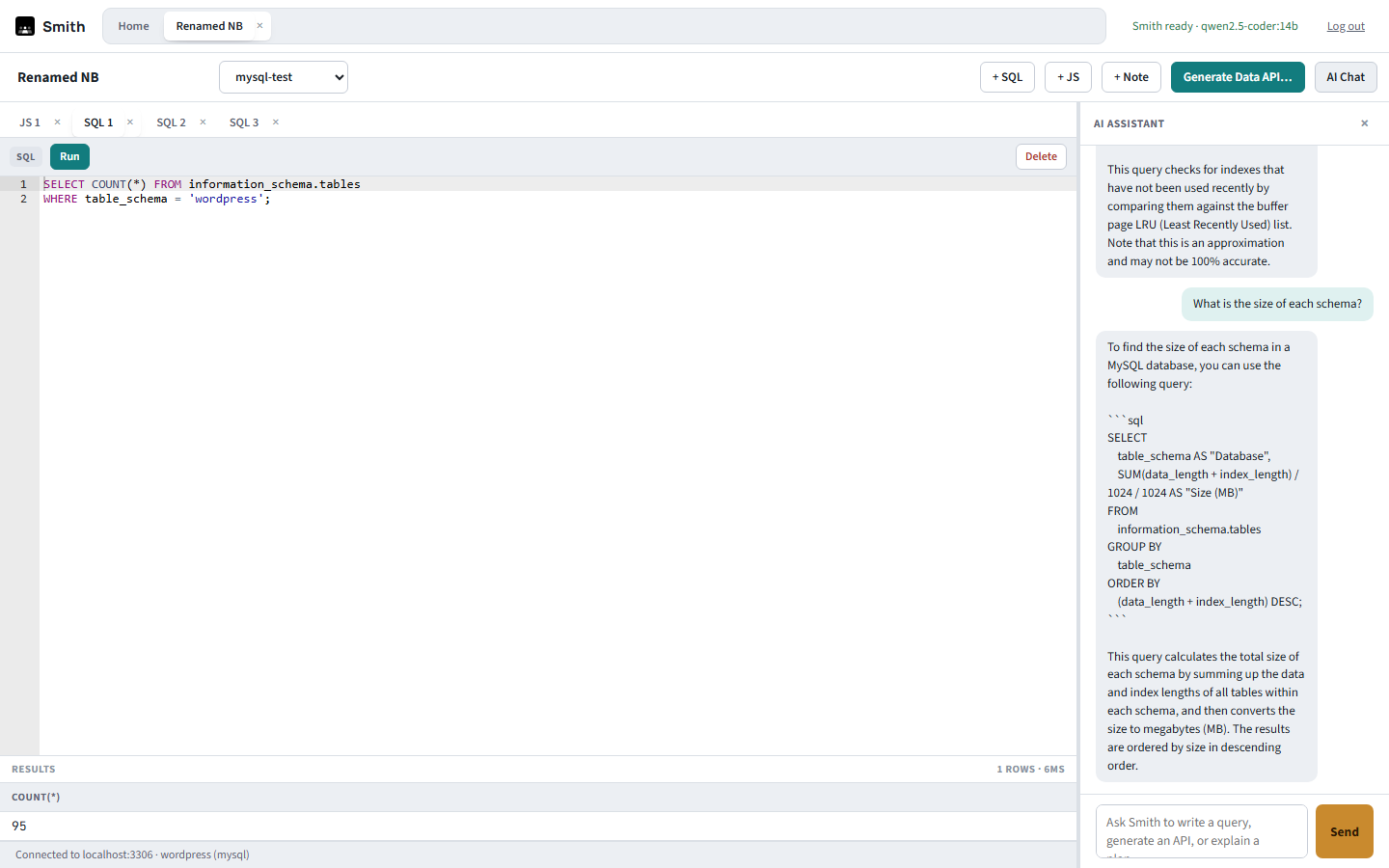
  • Chat-driven code generation for SQL and Node.js in tabbed SQL, JS, and Note cells, with version history
  • Deterministic Data API generation (list/get/create/update/delete) for PostgreSQL/TimescaleDB, MySQL/MariaDB/Doris, SQL Server/Azure SQL, Oracle, DB2, and Firebird, with an instant local preview
  • Notebooks also browse, query, and explain Snowflake, BigQuery, Athena, Spanner, Trino/Presto/Iceberg, Cassandra, Neo4j, InfluxDB, OpenSearch, Solr, DuckDB, Couchbase, and Elasticsearch
  • A deploy-target picker: a local preview, API workers in your own Docker deployment (every API behind its own access key), AWS Lambda, or a commit or pull request to your Git repo — API-worker and Lambda deploys of Core connections wait behind an approval request. Cloud Run, Cloudflare Workers, Azure Functions, and a standalone Docker target are on the roadmap
  • Performance-aware scaffolding — flags risks like connection-pool starvation before you ship
  • Your choice of model: self-hosted Ollama or vLLM, or OpenAI, Azure OpenAI, Anthropic, Bedrock, or Gemini, set once in Core
Smith notebook with tabbed SQL and JS cells, a SQL query with its result, and a docked AI Assistant panel answering a question about schema size

A live notebook: tabbed cells on the left, query results below, and the AI Assistant docked on the right — it answers with runnable SQL you choose to insert.

Data modeling

Blueprint

A web-based data modeler: reverse-engineer a live schema onto an ER canvas, edit it, and turn the difference into a reviewed, approved change — without Blueprint ever touching your database.

In development

Blueprint reads a schema from a Shared Data Connection — credentials are resolved from Core on each request and never stored — and draws it as tables and relationships. You model changes on the canvas; Blueprint generates the DDL, compares it with the live database, and files the result with a rollback script as a request in Core. It never runs DDL itself: an approver reads the exact script, and Detanami executes it.
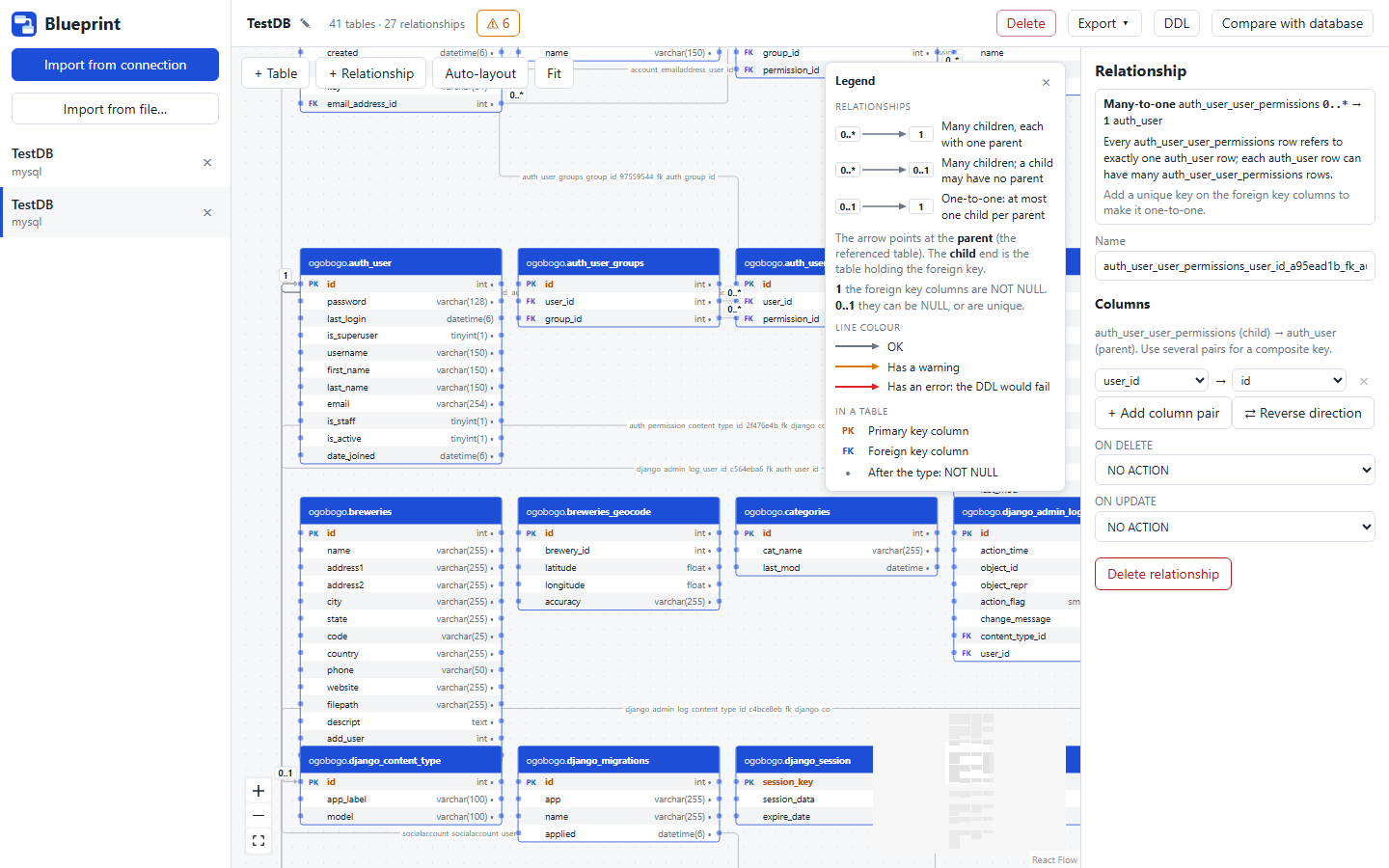
  • Reverse-engineer tables, columns, primary and foreign keys, and indexes from MySQL/MariaDB, PostgreSQL, and SQL Server/Azure SQL — choosing which schemas to bring in
  • An ER canvas: add, rename, and delete tables and columns, set keys (composite too), indexes, nullability, and defaults, and add relationships by dragging or from a dialog that guesses the column pairing; each line shows its cardinality (1, 0..1, 0..*) and can be reversed
  • Model checks that catch tables without a primary key, redundant indexes, mismatched foreign-key types, and dialect rules like SQL Server's cascade limits — errors block a deployment request
  • Dialect-specific DDL generation, and a Compare with database diff that produces an apply script and a rollback script, flagging destructive changes
  • Request deployment files the diff in Core's approval queue with a note for the approver; once approved, run it from Detanami
  • Export a model as JSON, a Markdown data dictionary, a Mermaid ER diagram, or a PNG/SVG picture — and import a model file back
  • Deep links across the suite — Model in Blueprint from a Detanami connection, and Generate a Data API from a Blueprint table into Smith
Blueprint with a relationship selected on a real MySQL import: the inspector explains its many-to-one cardinality and offers Reverse direction, the legend is open, and tables are linked by named foreign keys

A MySQL schema imported through a Shared Data Connection. Each line carries its cardinality (0..* to 1), the selected relationship is explained in plain words in the inspector, and the legend decodes the marks.

Coverage

Thirty-two databases, one console

Detanami connects to the engines already in your stack — no separate client per database type.

MySQL MariaDB PostgreSQL Amazon Redshift Microsoft SQL Server Azure SQL Oracle SQLite ClickHouse IBM DB2 Firebird Couchbase Elasticsearch Snowflake BigQuery Amazon Athena Cloud Spanner Apache Doris TimescaleDB DuckDB Trino Presto Apache Iceberg Apache Cassandra Neo4j InfluxDB OpenSearch Apache Solr Valkey Redis MongoDB CouchDB

All support TLS/SSL, except SQLite and DuckDB (local files have no network connection to secure) and Firebird; the cloud warehouses are always TLS.

Bring your data lifecycle onto one platform.

Add Detanami, DataMosaic, Flow, Smith, and Blueprint as your workflow needs them; skip the ones you don't.

Read the docs